
Benchmarking Kafka compression for increased performance and reduced cost
How Careem chose the right Kafka compression algorithm for better performance, lower latency, and reduced cost
2.5 years ago, Careem started building its next-generation Kafka platform. The goal was simple: move to a modern, Kubernetes-based architecture that could handle Careem’s scale. The migration worked well – we saw big improvements in latency, higher throughput, and lower costs through smart choices like ARM instances, optimized EBS volumes, and fewer brokers. But there was 1 area we hadn’t cracked yet: Kafka compression.
Broker disks were filling up fast. During traffic spikes, disk usage would climb quickly, forcing us to add extra storage capacity just to stay safe. And at Careem’s scale, storage spikes are a real risk to the reliability of the Everything App.
This wasn’t just a technical headache – it was hitting our wallet too. More traffic meant more disk space, more cross-AZ bandwidth, and more time spent on capacity planning.
At the start we tried using more restricted “retention periods”, which worked for sometime. But over time it stopped being effective – one topic can spike by terabytes in a single day
At the same time, the Catalog team encountered a blocking edge case while ingesting a merchant menu. a single item payload exceeded 4MB, failing to publish due to Kafka’s default 1MB message size limit. We usually allow teams to produce large messages via topic-level config. But 4MB+was too large and compression was the natural next step.
That is where we started the first iteration of benchmarking Kafka compression to see which compression algorithm works better for the case without compromising the service performance. The results were surprisingly promising! So we decided to use that benchmark as the basis for enabling compression on all Kafka topics company-wide – solving our last remaining challenge, broker storage, and cutting costs even further.
The benchmark was initially done to cover an edge case, but we decided to validate the findings on one production service that has large consumers (that represents our common Production case) and compare the results – eventually we applied compression on all the Kafka topics.
The compression paradox
Kafka supports multiple compression algorithms, and the savings looked good: less disk usage, lower cross-AZ network transfer costs, and slower disk fill rates. But there was one important question we needed to answer before using it everywhere:
What’s the CPU cost?
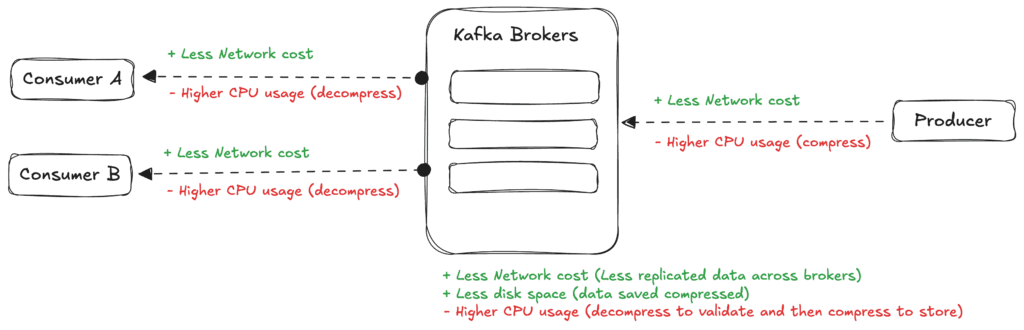
This question matters a lot at Careem’s scale. When you run hundreds of Kafka producers and consumers across dozens of services processing billions of messages every day, even a small CPU overhead caused by compression adds up to real infrastructure costs. A compression algorithm that saves 50% on storage but adds 30% to CPU usage might actually increase your total cloud spend, not reduce it.
We couldn’t just guess. We needed real data.
Save twice with compression
At that point we knew compression could be a powerful tool, but we wanted to be smart about where to use it. Kafka gives you a few choices: turn compression on at the producer, at the topic/broker, or both. Kafka also compresses batches (not single records), so bigger batches usually shrink better.
For our setup, producer-side compression made the most sense. Because here the data is compressed before it goes to Kafka over the network, and finally stored compressed on disk, which is great because that saves AWS cross AZ transfer cost in addition to disk cost, plus it also slows the rate at which broker disks fill up.
End to end, Kafka keeps this simple, the broker validates the batch and stores it compressed; consumers auto-decompress when they read. Kafka takes care of this automatically, so your applications don’t need to do anything (Consumers auto-detect compression and decompress seamlessly)
Benchmark the “edge case”, then validate the “common case”
Most of our production traffic is around 1 KB Avro messages on average, but we also have topics with much larger payloads. We started with benchmarking a large JSON message and then validated with our common production settings
So we did this in 2 steps:
-
**Benchmark with large messages:**We benchmarked 5 codecs: none (baseline), Snappy, Gzip, Zstd, and LZ4 by producing 200,000 real production messages, using a large ~4.37MB JSON payload
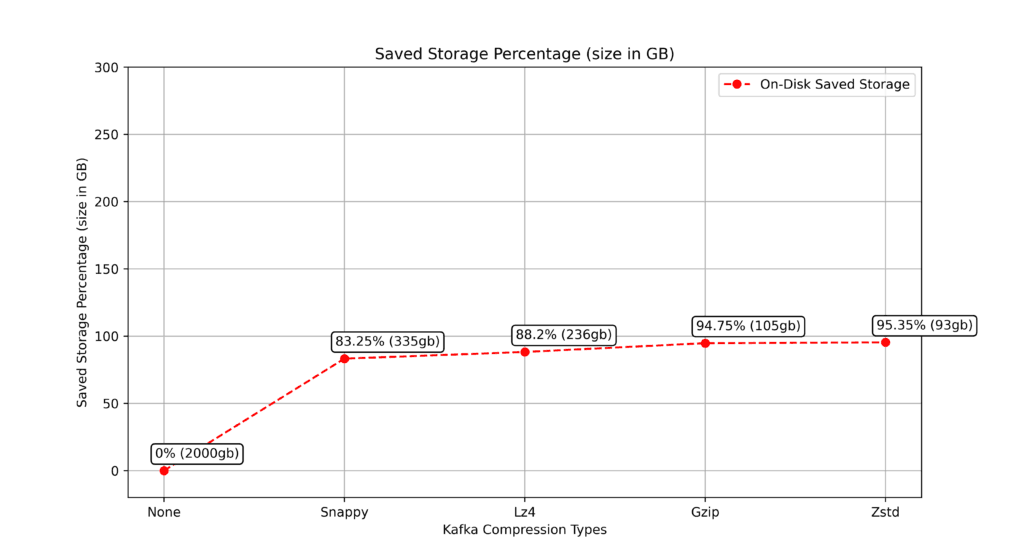
to replicate the specific Catalog edge case described above.This benchmark gave us clean, comparable signals on throughput, p99.9 latency, CPU overhead, and compression efficiency – and LZ4 came out as the best overall balance in that environment (e.g., 88.2% storage savings in the benchmark while keeping CPU overhead low).
-
Test in production with ~1 KB Avro messagesBecause the benchmark profile isn’t our average case, we then validated the benchmark winner “LZ4” on a high-volume production topic where messages average ~1 KB (Avro)
In production, the compression ratio was naturally lower (smaller messages + different batch size), but the trend held: we still saw meaningful savings—about ~45% reduction in topic storage and network bandwidth—with minimal CPU impact on producers and only a small increase on consumers for decompression.
Benchmark setup
Benchmarking criteria
Here are the test details:
- Test Cluster:
- Brokers: 12
- EC2 Instance Type: m5.2xlarge
- EBS Volume type: GP3 (Provisioned IOPS: 7000, Throughput: 650MBps)
Test Topic: - partitions: 12
- replication factor: 3
- min.insync.replicas: 2
- max.message.bytes: 4252830
- Produce Test:
- Number of records: 200,000 messages
- Message type: Json (No Avro)
- Sample Message Size 4.37MB
Metrics
We measured 4 things:
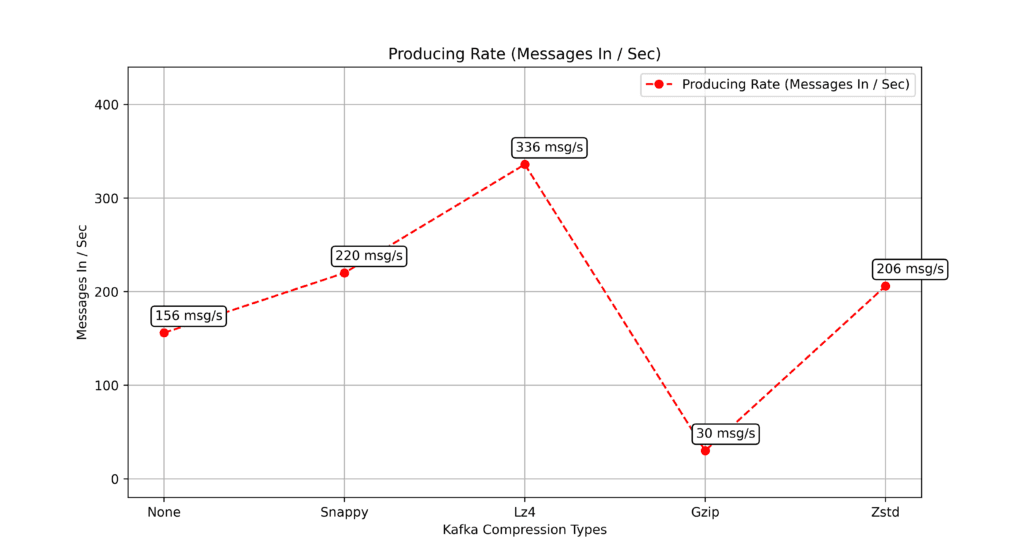
- throughput (messages produced per second)
- 99.9th‑percentile produce latency
- CPU overhead
- and storage savings
and compared them against a no‑compression baseline.
Benchmarking result
Before diving into the numbers, we defined a few simple goals for the compression codec:
• Speed: How quickly can producers publish messages? We looked at both overall throughput (higher is better) and produce latency (lower is better).
• CPU load: The lower cpu extra load is better
• Storage savings: A codec should shrink messages enough to meaningfully reduce disk space and network traffic (higher reduction is better).
• Balance**:** Ultimately, the “best” codec is the one that balances these three factors effectively.
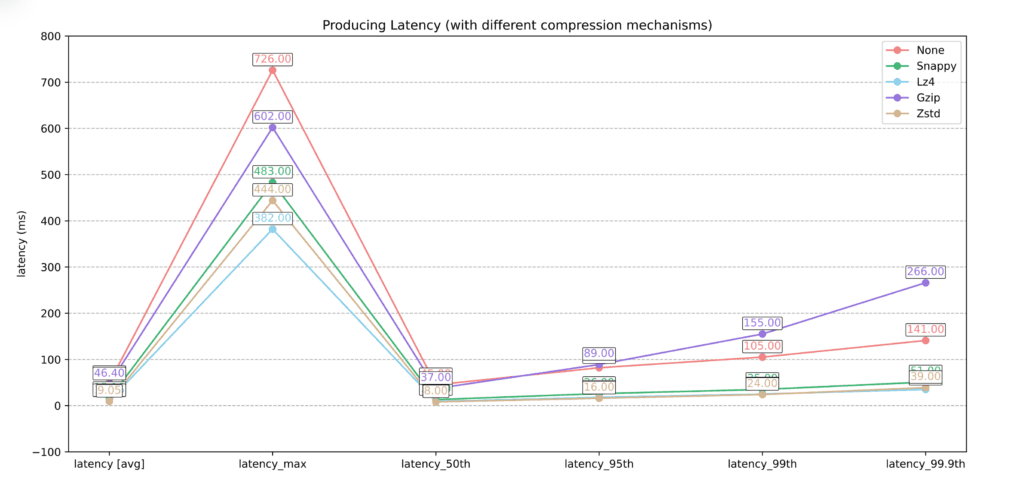
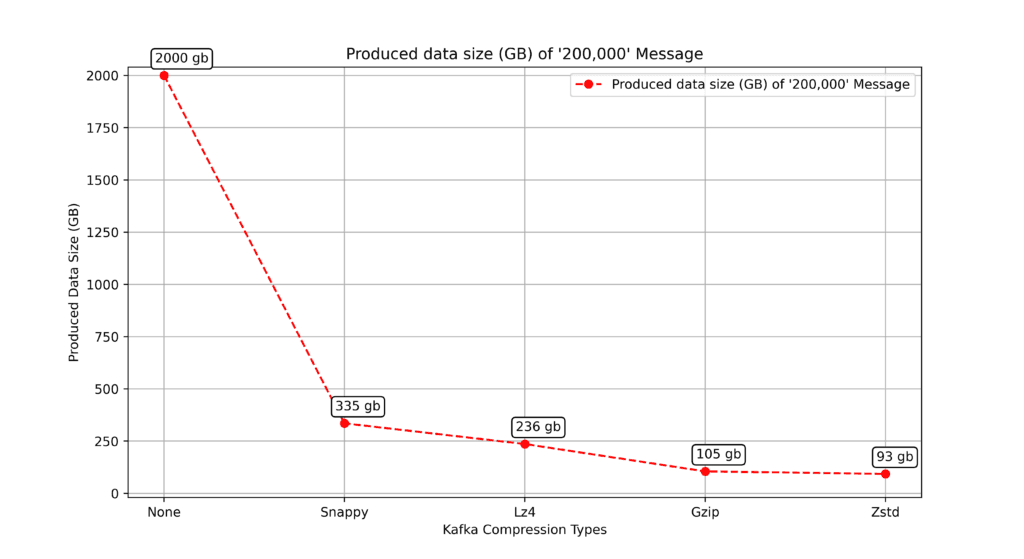
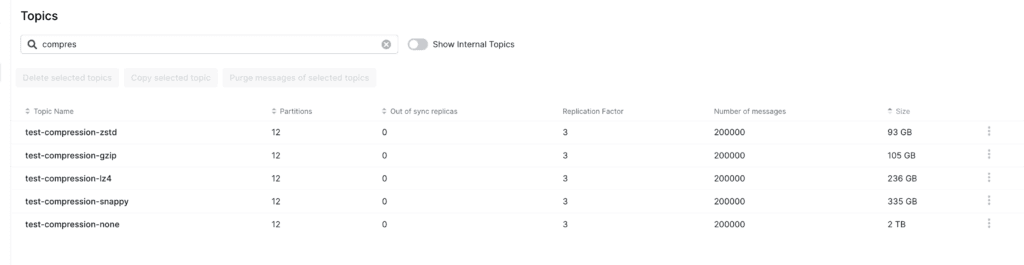
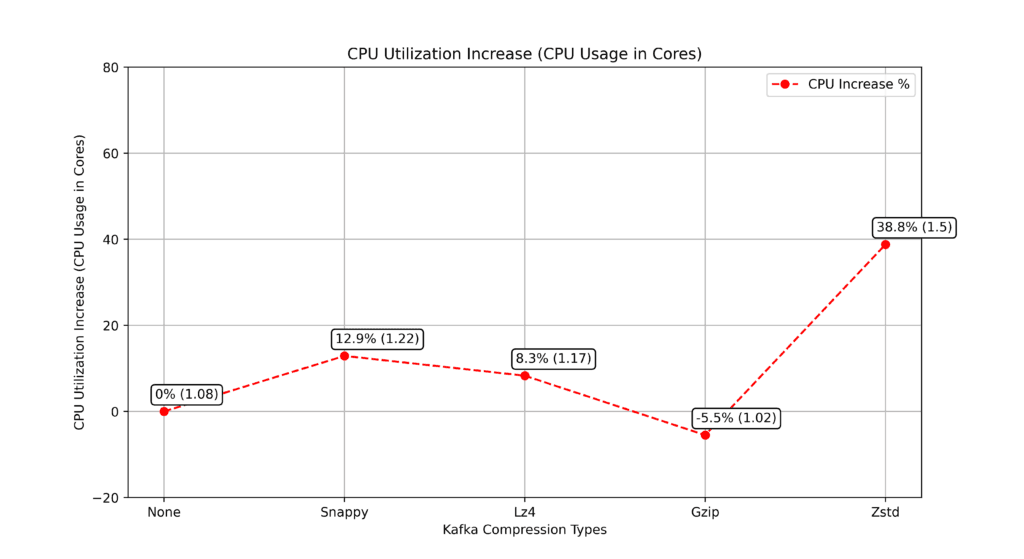
Why gzip shows a CPU decrease: gzip’s very low throughput (~30 msgs/s) leaves the producer mostly idle – waiting rather than doing work – so the average CPU over the test window is lower than the no-compression baseline.
Analysing the benchmarking result
Put simply, if the p99.9 latency is 100ms, that means 99.9% of your requests are faster than 100ms.
Performance vs compression trade-offs
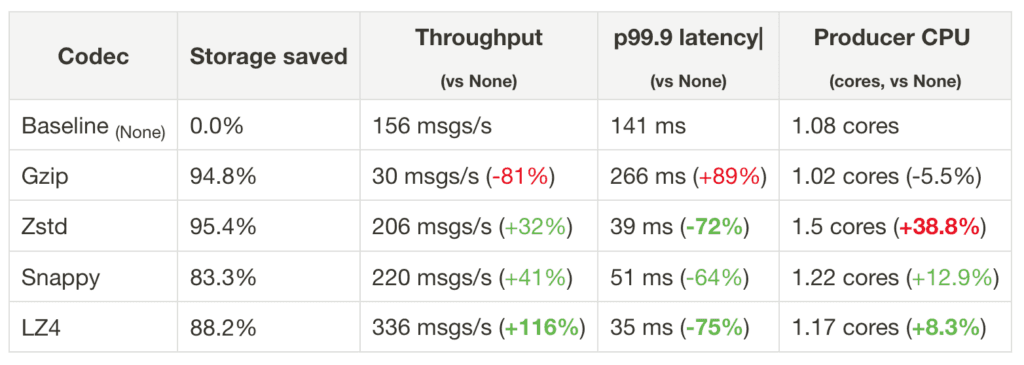
Looking at our benchmark results, each compression algorithm makes different trade-offs between storage, bandwidth savings, and performance:
What we learned
Gzip: provided high compression, but was extremely slow .. maybe it would act differently with small messages – we can’t really say it has a good performance, because the latency and CPU usage was impacted by its slowness.
Note: some compression algorithms might provide different performance when the benchmark is repeated with different input, like different message size or content.
Zstd: offered slightly better compression than Gzip, with good producing rate and perfect p99.9 latency! – the only flag is the cpu overhead – but still, it can be suitable for cases where storage saving is the main goal and the cpu cost is accepted.
Snappy: it provided good balance for the trade-offs, good compression, throughput, latency and most importantly moderate cpu usage.
LZ4: provided the perfect balance for the trade-offs with good storage saving, as it provided the highest produce throughput at the lowest latency and at the lowest cpu overhead
Note: Results vary with payload size/format and batching. We tested on large JSON, then validated on ~1 KB Avro in prod; trends held (LZ4 best balance). For storage-only scenarios, zstd/gzip may be chosen for higher compression, not speed.
Conclusion of the Kafka compression benchmark
LZ4 stands out as the sweet spot in this benchmark. It delivers impressive performance gains – more than doubling throughput to 336 msg/s while cutting latency by 75% to just 35ms. At the same time, you’re still getting solid compression with 88.2% storage savings, which keeps storage requirements reasonable.
What really seals the deal is the minimal CPU overhead at just 8.3%. You get all these benefits without burning through your compute resources, making LZ4 the clear winner in this benchmark.
LZ4 in production
We rolled out LZ4 on a high-volume production topic (Avro, ~1 KB average message size)
one setting on the producer, compression.type=lz4, and watched the graph.
Compression reduced both topic storage and network bandwidth by ~45%. The savings were lower than in our benchmark because production messages are smaller and are sent in smaller batches
It’s known that with larger batches you get better compression, and also throughout our production implementation we noticed that also with larger messages you get better compression.
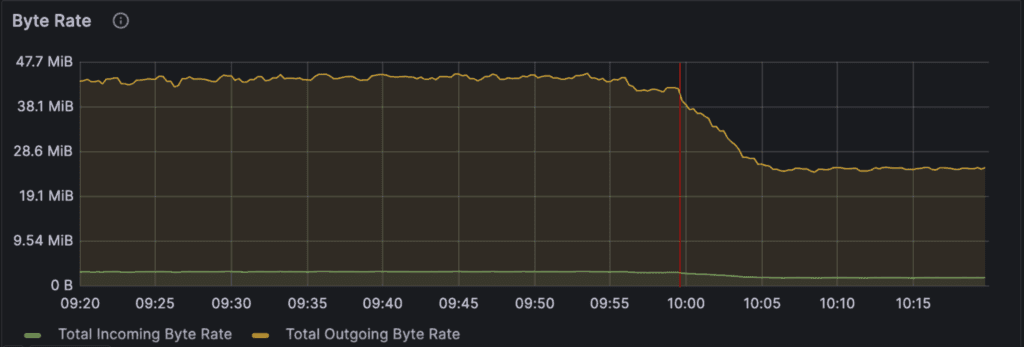
> Graph shows the data-IN and data-OUT for a single Kafka topic (before and after enabling LZ4 compression) – This topic shows Careem captain pings traffic
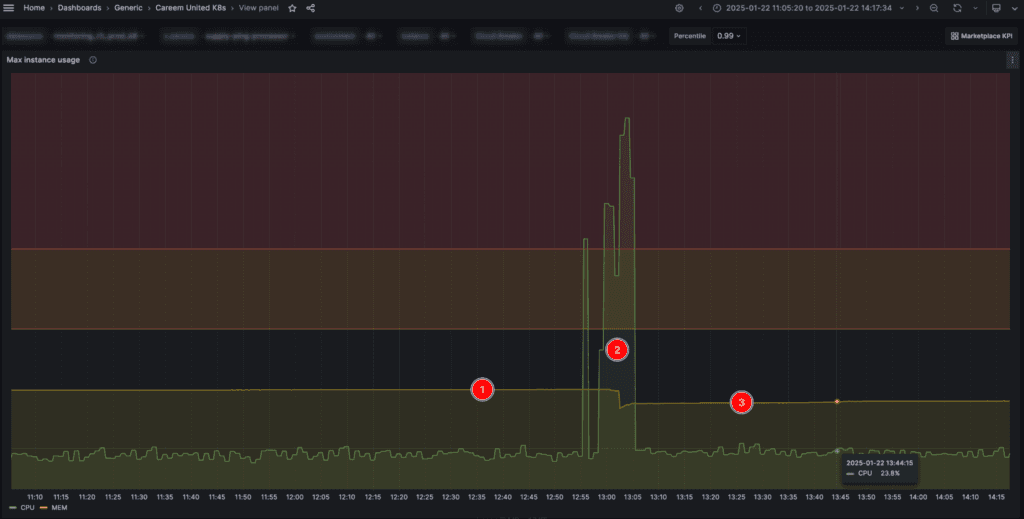
> Graph shows the performance impact on the Kafka topic producer while enabling compression.
- Point (1) shows the Performance BEFORE LZ4 compression is enabled on the producer
- Point (2) shows the producer service re-deployment to apply compression
- Point (3) shows the Performance AFTER LZ4 compression is enabled on the producer
And here it is clear that there is almost no performance impact on the CPU or memory.
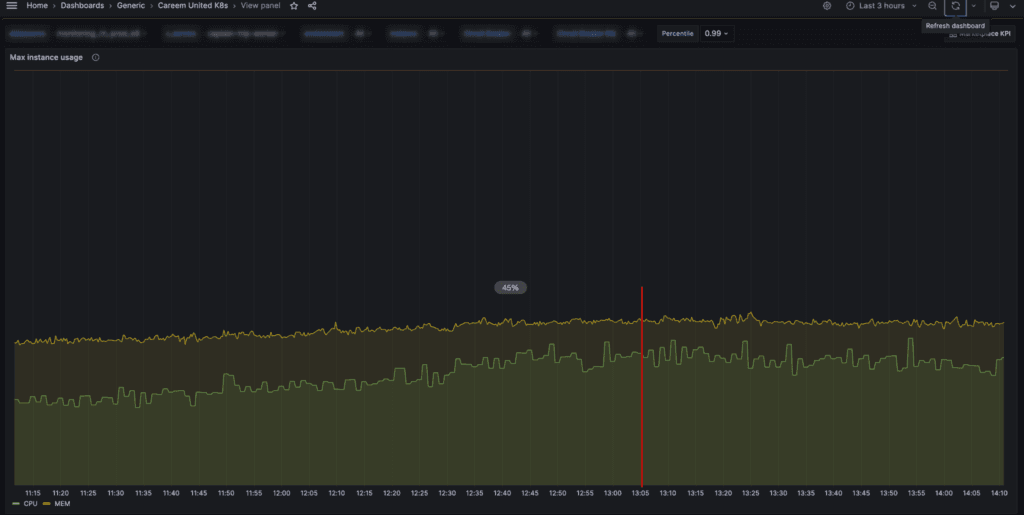
> Graph shows the performance impact on one of the Consumers of the Kafka Topic when compression got enabled on the Producer side
on the Topic’s consumers we see minimal CPU utilization increase for decompression (which aligns with our benchmarking results)
> NOTE: Kafka consumers auto-detect compression and decompress compressed messages automatically.
Conclusion
Kafka compression is one of the easiest ways to cut storage and cross-AZ network costs. The hard part is getting those savings without hurting producer/consumer performance.
From our tests and rollout, LZ4 gave the best overall balance: strong size reduction, fast throughput, low tail latency, and small CPU overhead. Because the rollout mirrors Careem’s typical workload (~1 KB Avro), we recommend LZ4 as the standard codec for large-scale Kafka at Careem, helping keep Kafka compression simple, fast, and cost-effective across the Everything App.
Appendix
A – Command used for benchmark
Here is the Produce command used for the benchmark:
kafka-producer-perf-test.sh \
--print-metrics \
--topic $topic_name \
--num-records 200000 \
--payload-file payload.json \
--throughput -1 \
--producer.config /tmp/config.properties \
--producer-props \
acks=1 \
batch.size=250000 \
bootstrap.servers=$bootstrap_servers \
compression.type=none # snappy || gzip || zstd || lz4
--payload-file payload.json – We tested with actual production messages.
--throughput -1 – no produce rate limit
acks=1 – acks=1 as it’s what’s commonly used in our production.
batch.size=250000 – high batch size number (within the recommended standards) - considering that compression is more efficient with larger batch size
Quote from “Kafka the definitive guide” book:
> sending larger batches means better compression both over the network and on the broker disks.
From Kafka Docs
> Compression is of full batches of data, so the efficacy of batching will also impact the compression ratio (more batching means better compression)
B – Kafka brokers decompress the batches for validation
From Kafka Docs:
> “The broker decompresses the batch in order to validate it. … This batch of messages is then written to disk in compressed form. The batch will remain compressed in the log and it will also be transmitted to the consumer in compressed form. The consumer decompresses any compressed data that it receives.”
This blog post is part of a series documenting our Kafka infrastructure journey at Careem.


